A guide to automating call center workflows in 2027


- Modern call center workflow automation is agentic: a long-running AI agent works toward a goal across your systems, keeps its context through pauses, and resumes when a document or approval arrives
- Rules-based tools follow fixed scripts and break on the unexpected, while AI agents read context and intent and adapt as a case unfolds
- The best workflows to automate span multiple systems and teams, run often, and carry real cost, like complaints, refunds, and account reinstatement
- Start with one workflow that has clear rules and well-documented steps, then expand as results hold up
A significant part of your agents’ time is likely spent on the work around each call, whether that’s typing notes, updating records, opening tickets, or chasing approvals.
Fortunately, today's contact centers can use workflow automations to take this work off human agents' plates.
To help you automate key workflows at your contact center, we’ll break down common use cases, how to prioritize your options, and the steps for implementing any automation.
But first, let’s align on how call center workflow automations work.
What is call center workflow automation?
It's an automation that uses a long-running AI agent to carry repeatable contact center work from start to finish across your systems.
Call center workflow automation follows a basic pattern:
- Trigger: the event that starts the workflow, such as a call ending, an intent being detected, or a form arriving
- Decision: the AI agent picks the next step using business rules and/or context like the account status and what the customer said
- Action: the task the system completes, such as updating the CRM, creating a case, or sending a confirmation message
In practice, contact center workflow automations are more complex than one trigger and one or two actions.
They have several decision points that vary based on the customer's account, the policy that applies, and what happens along the way, and they can run for hours or days while waiting on a document or an approval.
For example, here’s how complicated a workflow automation can look for a billing dispute refund:
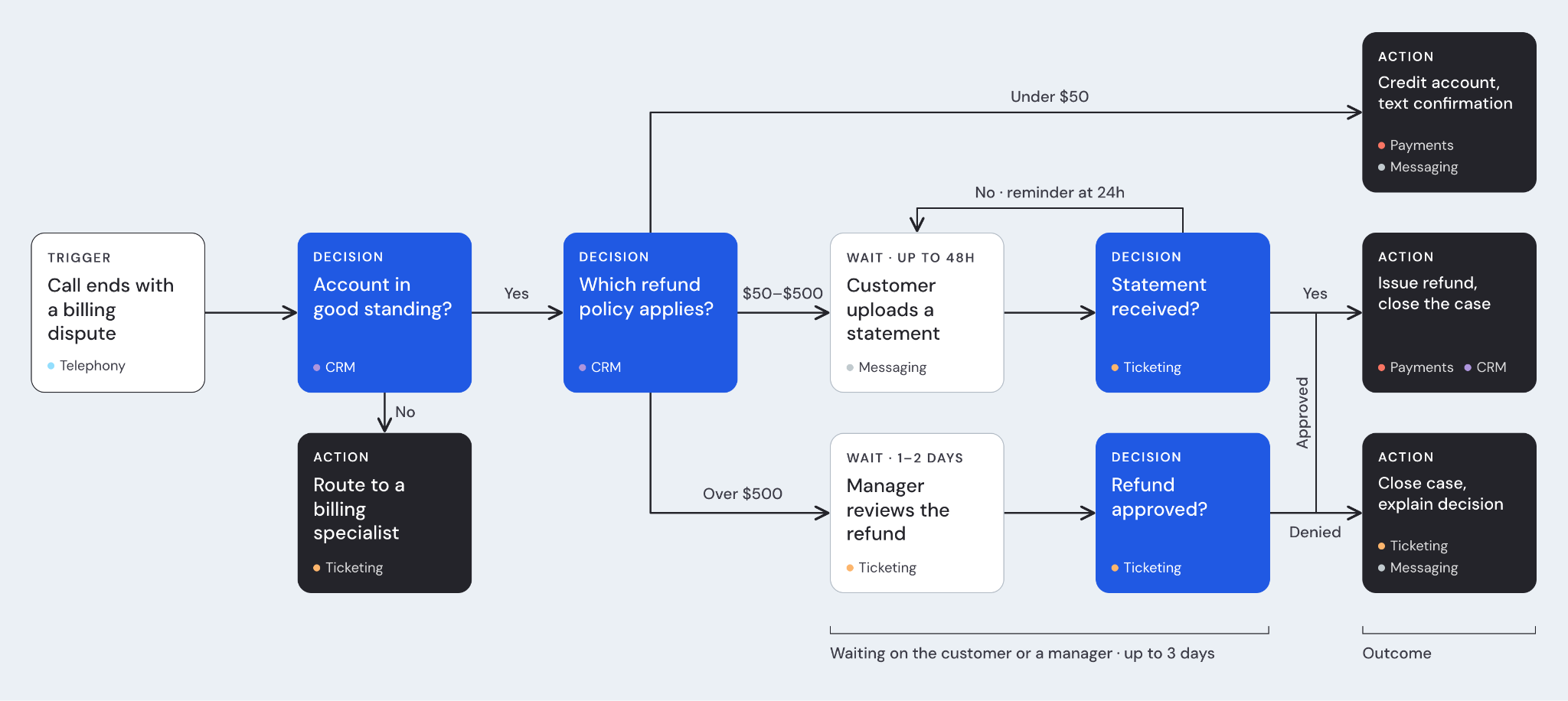
None of this also works without integrations with the systems involved in the workflows, whether it’s a CRM, a ticketing tool, or a telephony software.
Rules-based automation vs. AI-driven automation
Older call center automations run on fixed rules. Robotic process automation (RPA), for example, copies the clicks and keystrokes a person would make. And an IVR (interactive voice response) is the phone menu that asks callers to press or say an option.
Both work well when every case looks the same, but they break when a customer phrases something in an unexpected way or a case doesn't fit the script.
Modern call center workflow automations are AI-driven.
This means they can read the meaning and intent behind what a customer says. And the AI agent driving it should be able to keep track of a goal, choose their own next steps, use tools in your systems, and adjust when something changes.
Why call centers automate workflows
Now that you know how the pieces fit together, here's why teams invest in call center workflow automation.
- Less after-call work: agents spend less time on notes, dispositions, and data entry once a call ends
- Fewer manual errors: the system copies details between tools the same way every time
- Consistent compliance: required steps and disclosures happen on every interaction instead of only when someone remembers
- Faster resolution: cases move to the next step right away instead of waiting in someone's queue
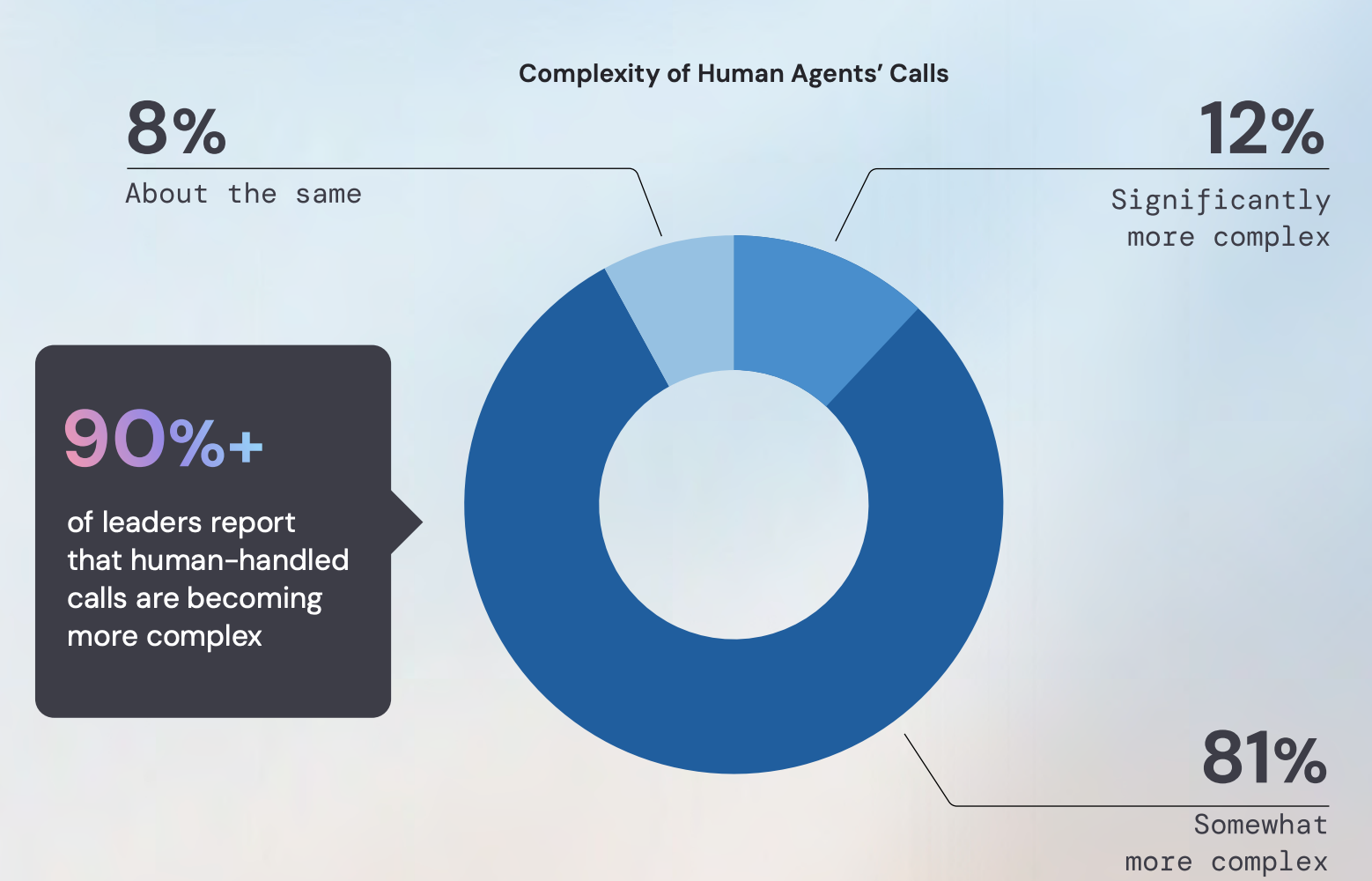
- More time for complex conversations: In our CX Workforce Report, more than 90% of the 300 IT and CX leaders we surveyed expect human agents to handle more complex calls, since those can’t be automated yet
Examples of call center workflow automations
The next question is where to apply the workflow automations.
Let's break down some common use cases.
Detect, classify, and route complaints before the call ends
Say your support team fields calls about billing errors, unrecognized charges, and payment disputes.
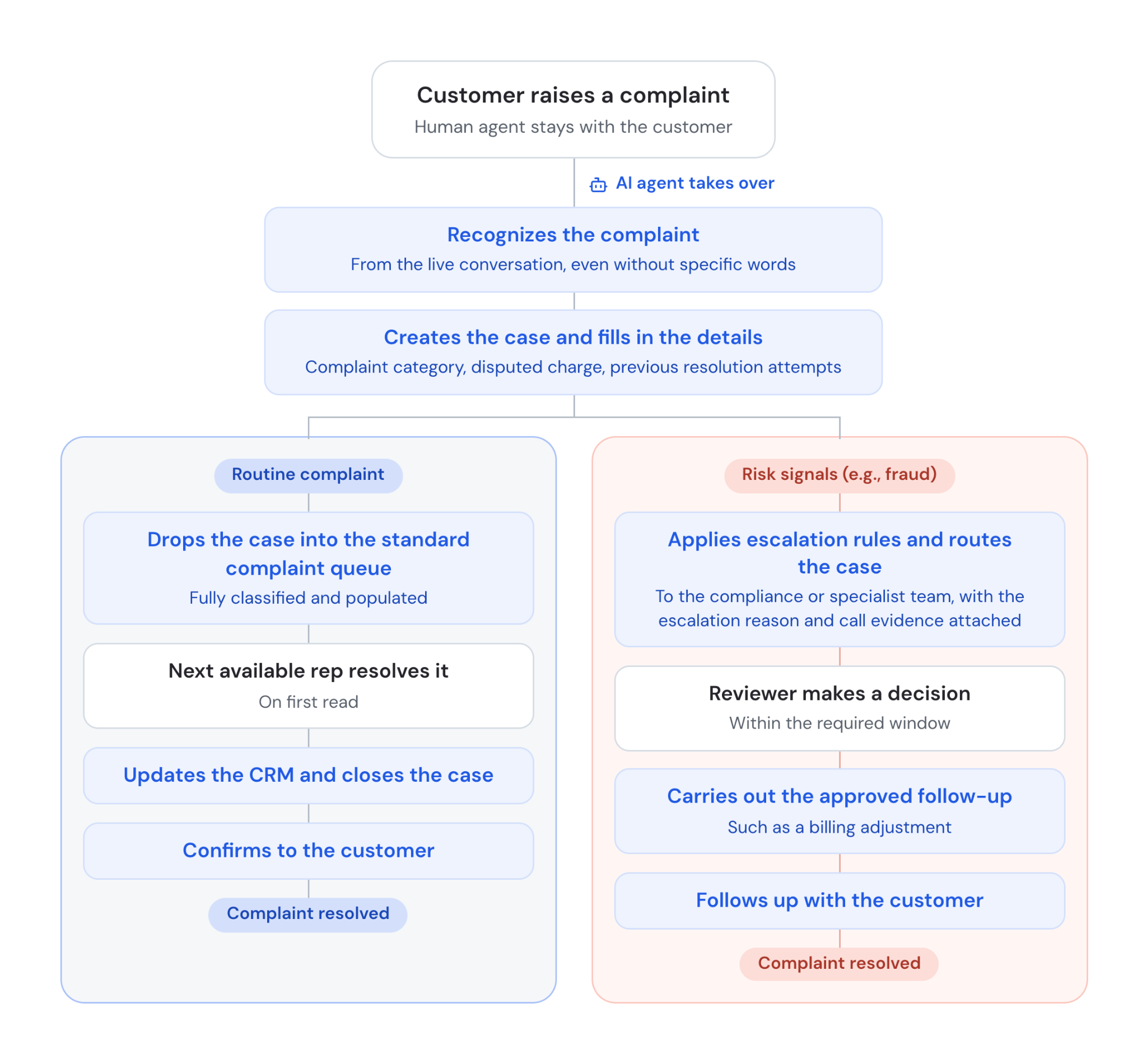
When a customer raises a complaint, a long-running AI agent uses GenAI intent models to understand it, even when the customer doesn’t use any particular words. The AI agent then kickstarts the right contact center workflow automation while the human agent stays with the customer.
It creates the case in your case-management system and fills in the details from the live transcript and customer records, including the complaint category, the disputed charge, and any previous resolution attempts.
- If the complaint is routine, the AI agent drops the case into the standard complaint queue fully classified and populated, so the next available rep can resolve it on first read. Once the rep records the resolution, the AI agent updates the CRM, closes the case, and sends the customer a confirmation via email or text that it’s been taken care of
- If the complaint carries risk signals, like a mention of fraud, the AI agent applies your escalation rules and routes the case to the compliance or specialist team right away. The AI agent flags the reason for escalation and attaches evidence from the call, so a reviewer can act within the required window instead of spending that time piecing the case together
The AI agent saves its progress while it waits for a decision, even if that takes several days. And once there’s a decision, the AI agent carries out the approved follow-up, such as a billing adjustment, and communicates with the customer on its own via email or text.
Initiate, verify, and settle refunds quickly
Imagine your team handles refund requests for damaged, missing, or returned orders.
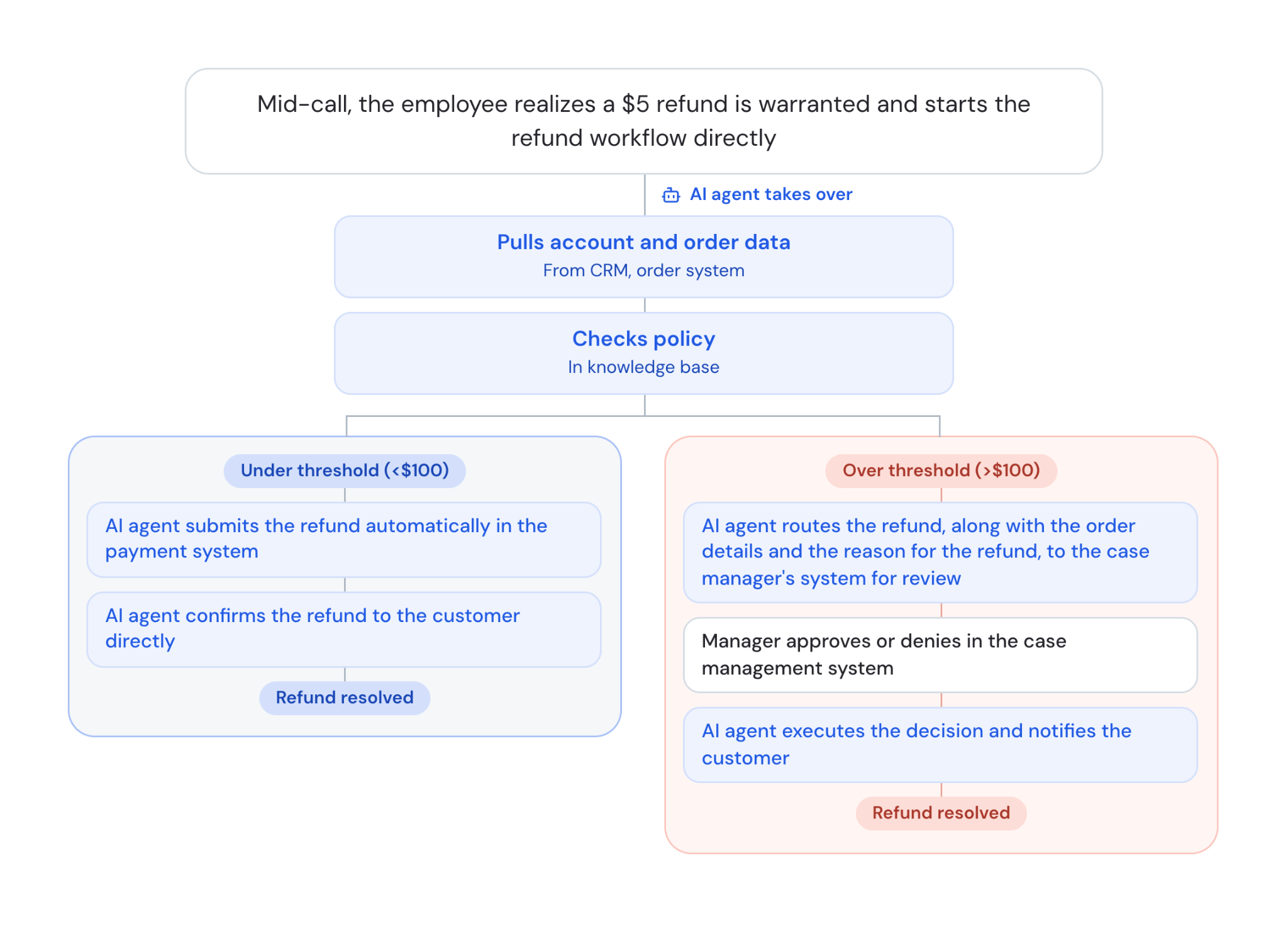
Mid-call, a human agent might realize a refund is warranted because the customer's package arrived broken. Instead of handling the refund manually, the employee can start the workflow with a few clicks, and a long-running AI agent takes it the rest of the way.
The long-running agent gathers the refund details already in the conversation, pulls any additional account or order data it needs from connected systems, and checks the refund against your policy.
Based on the dollar amount, it launches one of two workflows:
- If the refund falls under your approval threshold (e.g., <$100), the AI agent submits it and begins the refund process automatically in your payment system. It (or another AI agent that works alongside it) then emails or texts the customer to confirm the refund amount and when it should arrive
- If the refund is above that threshold, the AI agent routes it to a manager for review, with the order details and reason for the refund included so they have full context. It waits for the manager to approve or reject it, and then the agent (or another AI agent that works alongside it) carries out the decision and notifies the customer of the outcome by email or text
Restore a lapsing account before coverage or service is interrupted
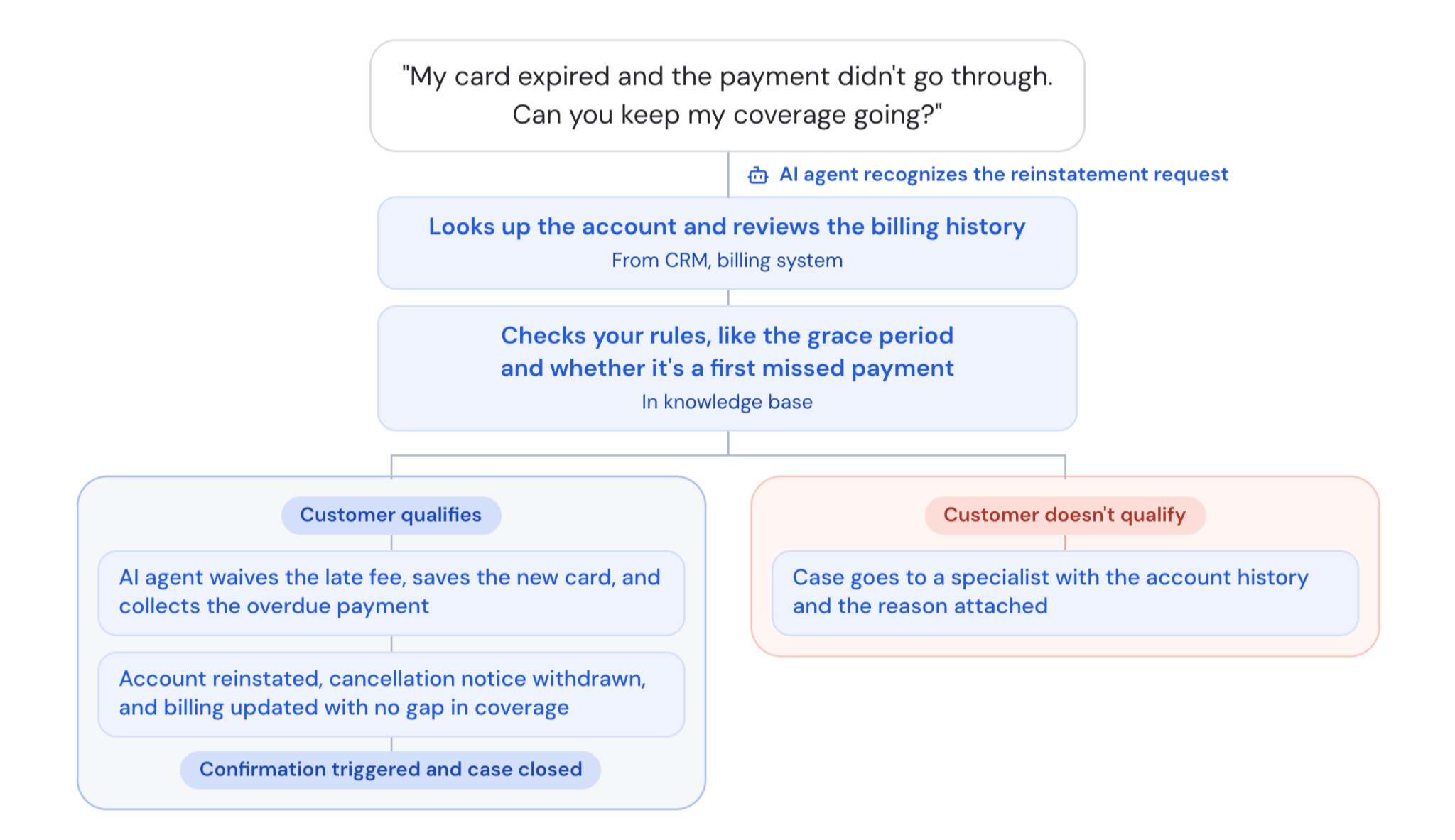
Say your team gets calls from customers whose account is about to be canceled after a failed payment, like an insurance policy or a subscription where the card on file expired.
During the call, a long-running AI agent recognizes the reinstatement request and starts the workflow while the human agent stays with the customer. It looks up the account in your account system, pulls the payment history from your billing system, and checks the situation against the reinstatement rules in your knowledge base, such as whether the customer is still within the grace period and whether this is a first missed payment.
Based on what it finds, the AI agent launches one of two workflows:
- If the customer qualifies, the AI agent waives the late fee in your billing system, saves the new payment method and collects the overdue payment in your payment system, and reinstates the account in your policy administration system with no approval step
- If the customer doesn’t qualify, the AI agent opens a case in your case-management system and routes it to a specialist with the account history and the reason attached
Once the account is reinstated, the AI agent withdraws the cancellation notice, updates billing, triggers a confirmation to the customer, and closes the case, so there’s no gap in coverage.
How to decide which workflows to automate
Knowing what you can automate is only half the job. The harder part is choosing what you should automate first.
A useful way to prioritize is to weigh each candidate workflow against six factors:
- Cross-system and cross-team complexity: how many systems and teams the workflow touches before it's done. More handoffs mean more copying, chasing, and lost context
- Expected pauses: how often the work waits on a document, a customer reply, or an approval. Workflows that stall for hours or days gain the most from automation that keeps context and resumes on its own
- Volume and repeatability: how often the workflow runs and how closely each case follows the same path
- Error and rework risk: how often hand-typed fields, missed steps, or lost context send work back for fixes
- Level of documentation: A long-running AI agent follows your business rules and standard operating procedures (SOPs), so the clearer they are, the faster it can be set up and the more reliably it runs.
- Approval and compliance structure: how clearly you've defined what can run on its own, what needs sign-off, and what must be recorded.
- Financial impact: what the current process costs in labor, errors, and delays, and what faster resolution is worth
Related: A guide to automating the customer experience
How to implement call center workflow automations
Once you know which workflows to automate first, you can plan the rollout. These steps keep the first launch small, safe, and easy to measure.
- Map current workflows and pain points. Write down how each target workflow runs today, step by step and system by system. Talk to agents, because they know where the copy-and-paste work and delays really happen.
- Pick a high-volume, low-risk starting point. For your first call center workflow automation project, choose a workflow that happens often but won't cause serious harm if it fails. Call summaries and order status updates are common choices. A strong first win builds trust with agents and leaders. It also gives you clean data on what works before you take on higher-stakes workflows.
- Connect your systems. Call center automation software is only as useful as the systems it can reach.To that end, list every tool the workflow touches, like the CRM, ticketing, telephony, knowledge base, and billing, and confirm each one can connect.
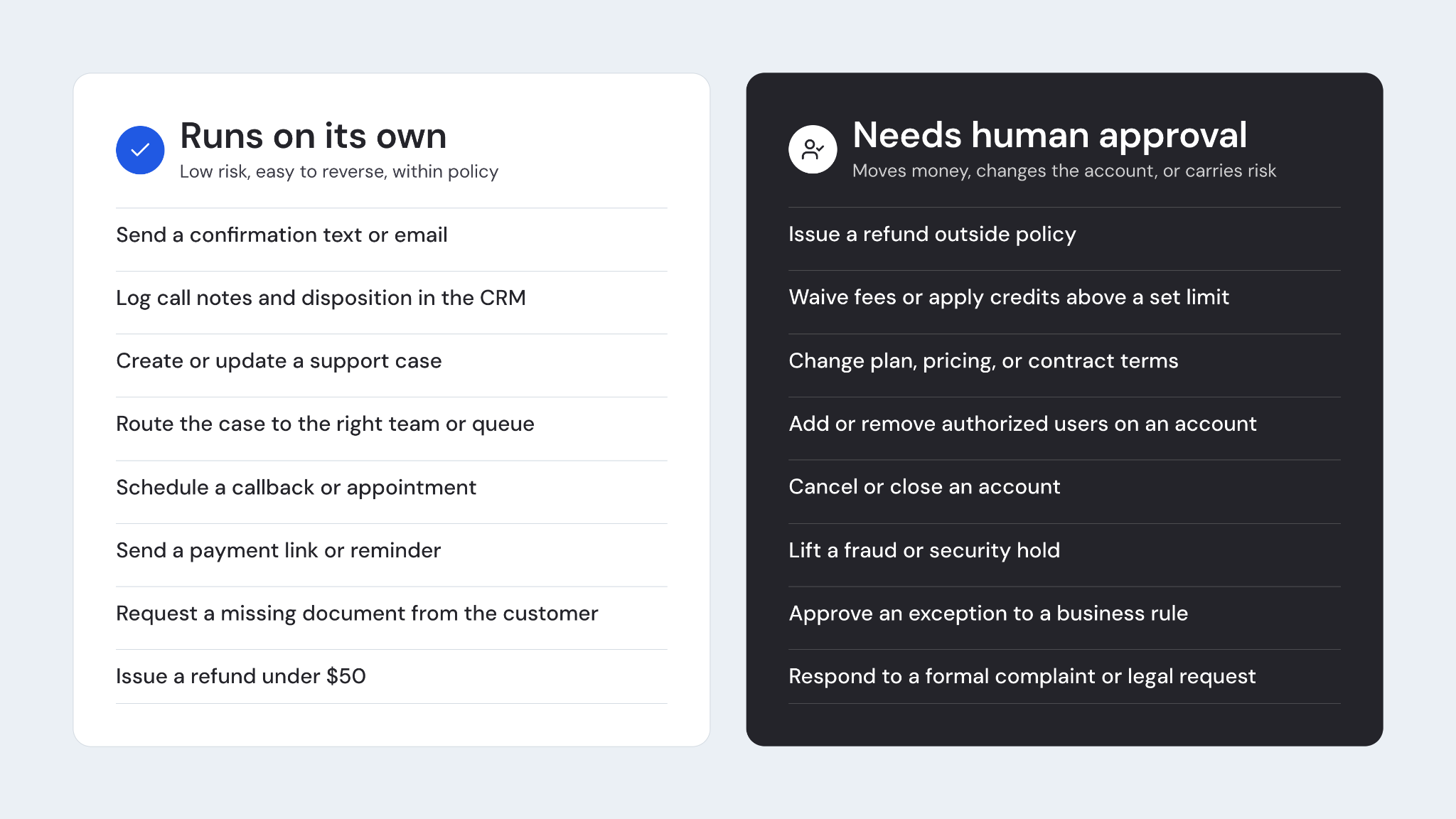
- Set guardrails and approval points. Decide which actions can run on their own and which ones need a person to approve them, such as refunds or account changes.
5. Test, launch, and measure. Test the workflow against real past conversations before customers see it. Then launch to a small group, watch closely, and expand once results hold up. As you roll it out, measure a wide range of metrics, including whether issues get resolved, how much after-call work time drops, how QA scores change, and how CSAT moves.
Related: How to roll out AI at your contact center
Automate call center workflows end to end with Cresta Deputy Agent
Most of the workflows in this guide run past the end of the call. They cross systems and teams, stall while waiting on a document or an approval, and need someone to keep them moving.
That's the work Cresta Deputy Agent is built to take on.
Cresta Deputy Agent is a long-running AI agent built to automate end-to-end workflows across customer experience operations.
It remembers the goal, what's been done, what information is still missing, and what happens next, so work keeps its context through pauses that last anywhere from minutes to weeks.
It works in three ways:
- In the call: Deputy Agent works alongside human agents through Agentic Assist. When it detects a condition you've defined, like a complaint, it starts the workflow, creating the case and filling in fields from the conversation while the agent stays with the customer
- After the call: it takes a handoff from a human agent or Cresta AI Agent with the full context and continues the same workflow. If the customer calls back or sends a document, it ties the new information to the same request
- In the back office: it runs workflows that never start in a conversation, triggered by a system event, a document, or a queue item
See how Cresta Deputy Agent can carry your workflows through to completion by requesting a demo.