
What is agent assist? Plus tips for choosing the right platform in 2026
.avif)

- Agent assist is real-time AI that augments human agents during live customer conversations. Cresta Agent Assist is built around behavioral recognition, so guidance is triggered by what’s happening in the conversation and tied to a specific outcome
- Agent assist closes the performance gap on the hardest conversations—the ones still left to humans—cutting handle time, speeding ramp-up, and improving consistency
- Evaluate agent assist and other agent assist products by latency, in-workspace knowledge retrieval, adaptive guidance, omnichannel coverage, and native CRM and CCaaS integrations
The best contact center agents have always carried the job in their heads, whether it’s sticky notes with undocumented policy exceptions or a private cheat sheet of which system holds which answer.
Great agents make it look easy. They've just had to work around their tools to do it.
Cresta Agent Assist is built to make human agents’ lives easier by listening to the live conversation and putting the right answer, next step, and words in front of the agent before they go looking.
The catch is that dozens of platforms now offer agent assist products, so it can be hard to sift through the noise and find the one that actually meets your human agents’ requirements.
This guide will help by breaking down the criteria you should prioritize in your evaluation. But to start, let’s align on what agent assist is and how it works.
What is agent assist?
Agent assist, or real-time agent assist, is AI that augments human agents during live customer conversations. It continuously listens, interprets intent and the full context of the conversation (not just keywords), and delivers precise answers, outcome-driven guidance, and workflows exactly when they're needed.
Agent assist works across voice, chat, and email without interacting with the customer directly. Where an AI agent handles a conversation on its own, agent assist keeps the human in control.
Agent Assist vs. chatbot vs. AI agent
The fastest way to understand agent Assist is by what it isn't.
A chatbot answers the customer. An AI agent resolves the customer's issue autonomously. agent assist makes the human handling the issue faster, more accurate, and more consistent.
On a mature Customer Experience AI platform these aren't competing products. They're a division of labor: automation takes the volume it can resolve, and the human takes what's left, with better real-time guidance.
How agent assist works
Here are the core components of how agent assist operates.
Real-time conversation analysis
Every interaction starts with speech-to-text. Transcription has to run fast enough to influence the conversation while it's still happening, because it's the prerequisite for every downstream prompt the agent will see.
From that transcript, natural language models classify intent, extract entities like account numbers and product names, and read the emotional direction of the call. agent assist also pulls customer data from the CRM, including account history and open cases, so guidance reflects who's on the line.
Proactive, in-workflow guidance
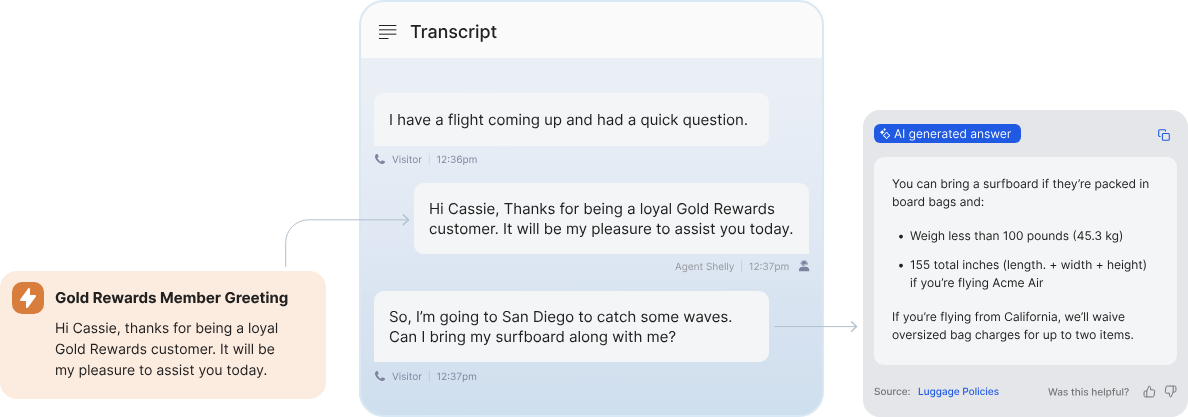
This is where most agent assist tools fall short. Recognized intent should trigger knowledge retrieval automatically, without the agent typing a query or switching tabs.
Agent assist does this with a knowledge agent that runs in a persistent browser sidebar, travels across the agent's tabs (CRM, billing, booking systems), and listens to live audio without being prompted.
It also reads structured fields from the agent's active screen, such as account status, order history, or loyalty tier. This lets it tailor a cited answer to the exact customer scenario, even when the customer never stated those details out loud.
And when the conversation calls for a procedure, the knowledge agent can surface the right guided workflow and walk the agent through it step by step. This keeps generalists on approved playbooks and lets them handle a wider range of issues without transferring or holding.
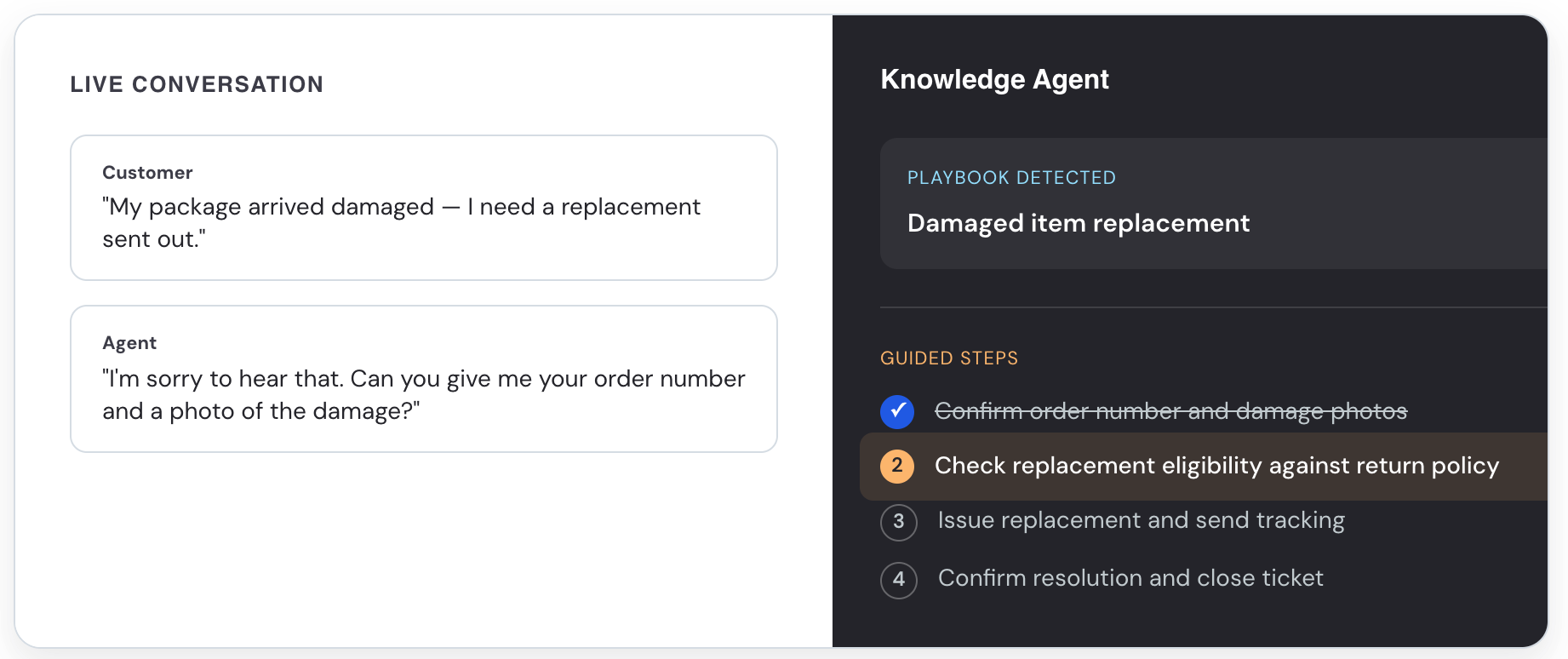
Behind that sits unified knowledge. Agent assist consolidates and syncs content from across the stack (knowledge bases, file stores, CRMs, and web sources) into a single source of truth, so its guidance and information stay up to date.
Chat efficiency
Not every interaction is spoken. In chat and email, the agent is typing in real time, and every extra second spent composing a reply is time the customer spends waiting.
Agent assist reads the thread history, the customer's last message, and relevant account details to propose a ready-to-send response the agent can accept, edit, or dismiss.
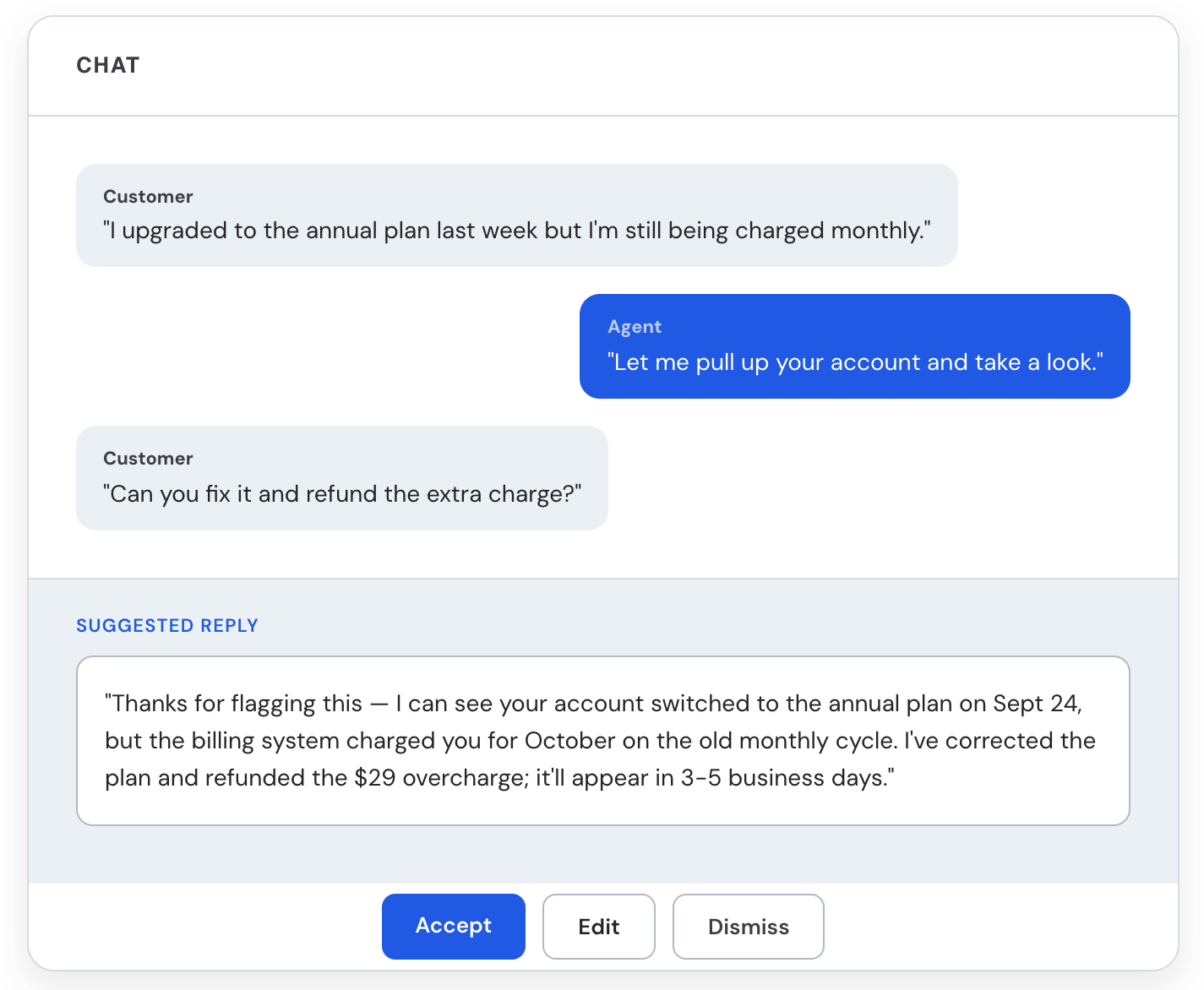
This extends to the smaller, repetitive parts of typing too: expanding shorthand into full sentences, inserting approved language for disclosures or policies, and auto-completing answers to common questions. The agent still decides what actually gets sent, but spends far less time producing it from scratch.
The payoff shows up in capacity: agents can hold more concurrent chats and clear email queues faster, without sacrificing the tone, accuracy, or compliance of what customers receive.
Post-interaction automation
Wrap-up work follows every interaction. To help minimize it and make sure no information slips through the cracks, agent assist generates an AI summary the moment a conversation ends, capturing the reason for contact, actions taken, and follow-ups.
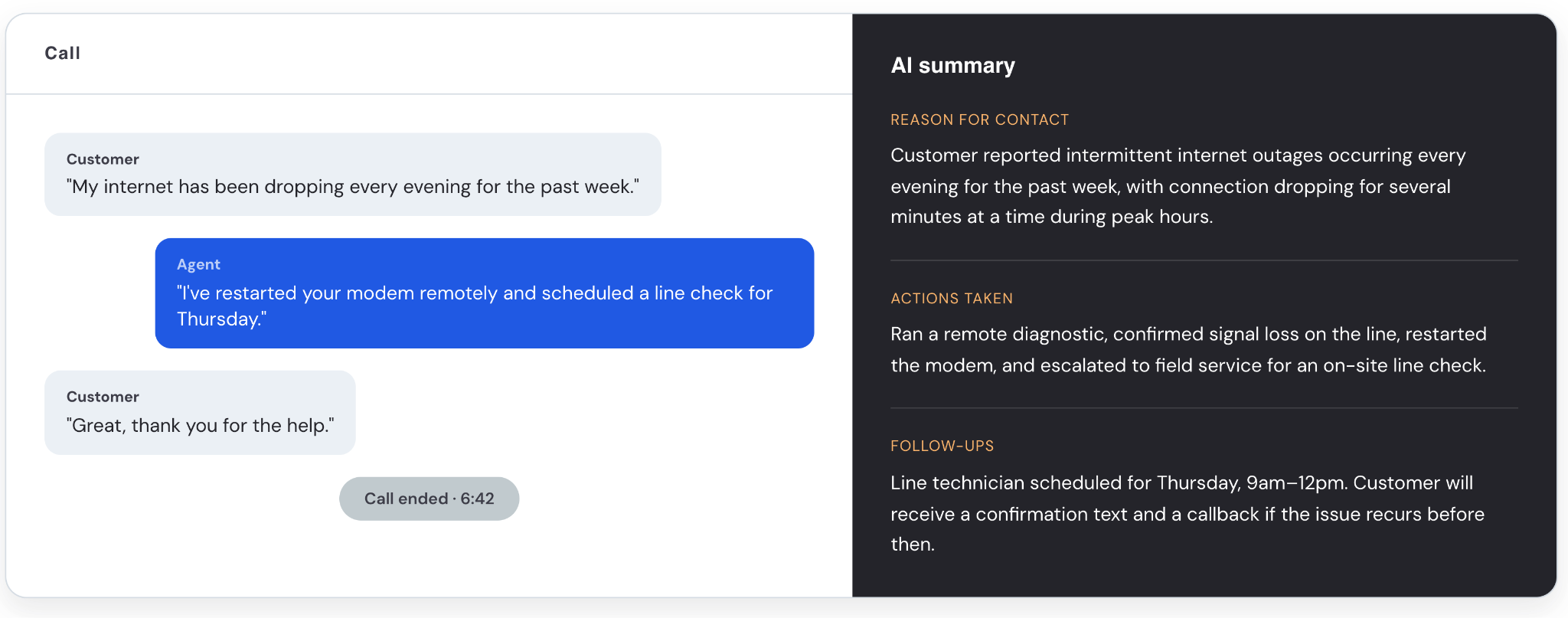
The agent can review and edit it, then push it to the CRM. Minutes of note-taking become seconds of verification, and those records become the input for quality scoring and coaching.
Key benefits of agent assist
Here are the top benefits we see time and time again from agent assist.
Reduced handle time and after-call work
Real-time knowledge surfacing gets human agents to answers faster, typing efficiency helps agents respond quicker, and automated summaries replace manual note-taking. Taken together, agents move through interactions faster and spend less time on admin.
This has played out in robust academic research. For example, a peer-reviewed study in the Quarterly Journal of Economics of 5,172 support agents found AI assistance raised issues resolved per hour by 15% on average. Less skilled and less experienced agents saw gains of about 30%.
And we’ve seen this from customers that use Cresta Agent Assist. United Airlines, for example, equipped agents with in-the-moment guidance and saw a 15% improvement in average handle time and a 50% improvement in customer response time.
Improved customer experience
Faster answers and consistent guidance don't just help the agent, they show up directly in how the customer rates the interaction.
When agent Assist steers agents toward the right language and behaviors in the moment instead of leaving them to improvise, customers get a more accurate, empathetic, and productive experience regardless of who happens to pick up.
One of our customers in the financial services space, Snap Finance, saw this play out directly. After rolling out real-time guidance alongside conversation intelligence, the company saw a 23% higher CSAT score.
Faster onboarding for human agents
New agents take time to reach full productivity, and the ramp repeats every time a team backfills attrition. According to McKinsey research on contact center onboarding, new hires need about four to six months to reach peak proficiency, costing 5 to 10 percent of total agent cost allocation.
Agent assist closes that gap because top-performer behavior shows up for every agent during live conversations. In the QJE study, agents with two months of tenure and AI access performed as well as or better than agents with more than six months of tenure without it.
Consistent compliance and quality
Missed disclosures carry real penalties. For example, under the FTC's Telemarketing Sales Rule, sales callers must disclose key facts up front, and violations can cost up to $53,088 each.
Agent assist surfaces compliance reminders at the right moment and records them for review.
Improved retention
Every departure restarts the recruiting and ramp cycle described above, and turnover compounds fast. Contact center attrition runs 30% to 45% a year industry-wide, and replacing a single agent can cost up to $46,000 once recruiting, training, and lost productivity are factored in.
Better tooling can reduce the cognitive overload that pushes agents out. We saw that when Oportun, another finserv company, started using Cresta Agent Assist.
When they gave agents real-time coaching and transcription support, human agents cited increased confidence, productivity, and autonomy on calls, and attrition declined as a result.
How to evaluate agent assist platforms
Agent assist software can demo well and still break in production. Here are seven criteria to help you compare agent assist with other options and find the best platform for your team.
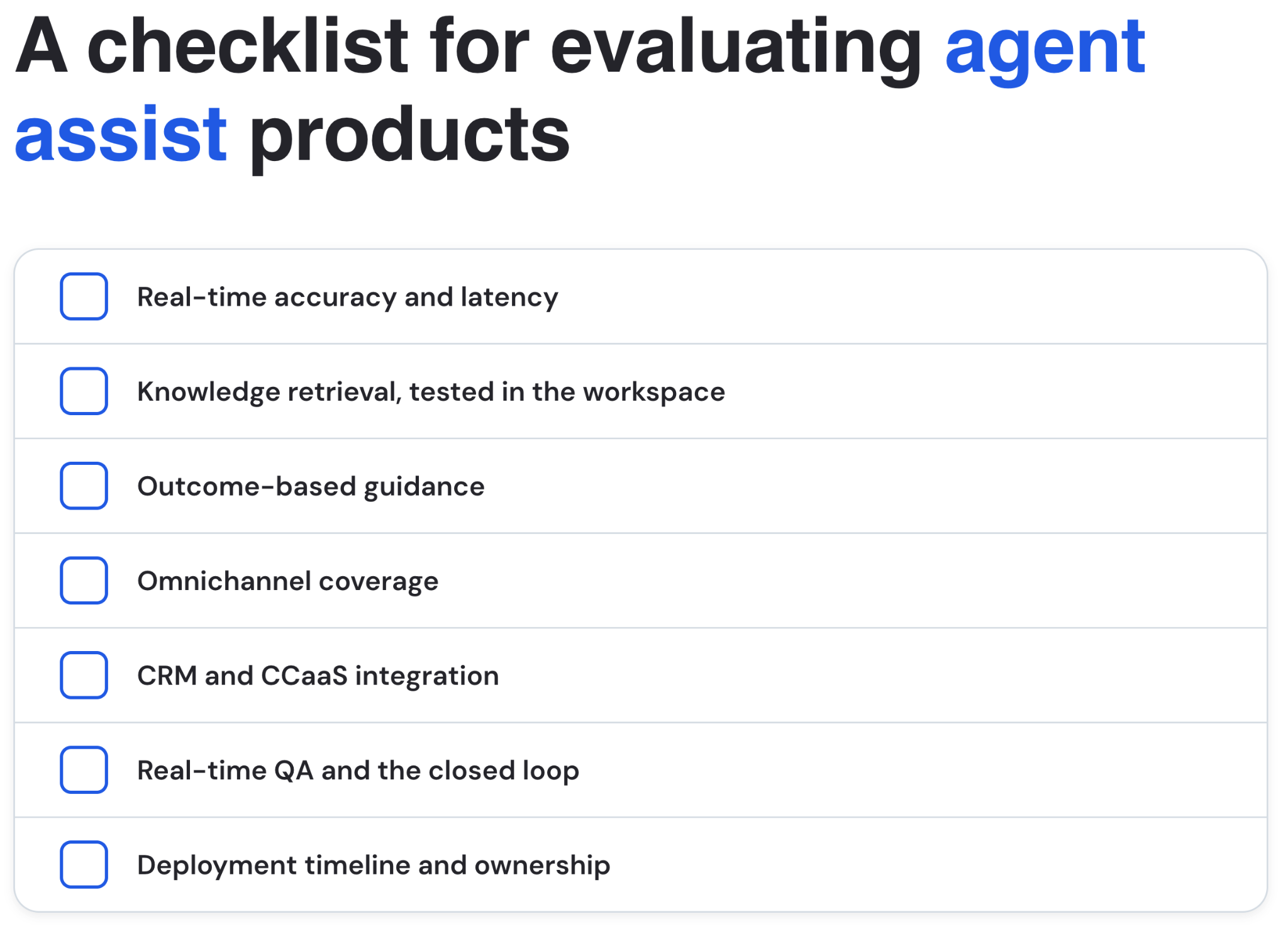
1. Real-time accuracy and latency
Every downstream feature inherits the ceiling set by transcription. If speech-to-text misreads a product name, knowledge retrieval and compliance flagging both degrade.
Don't accept a vendor's accuracy benchmark. Test transcription on your own call audio, in your own acoustic conditions.
When you’re talking to vendors, ask: what's end-to-end latency from spoken word to on-screen guidance, measured on our audio?
2. Knowledge retrieval, tested in the workspace
Evaluate retrieval where the agent works, not in the repository.
This means confirming the tool can query your existing knowledge sources without a full content migration, and that answers surface inside the agent workspace rather than in a separate window.
When you’re talking to vendors, ask: which of our knowledge sources can you connect to on day one, and what has to be migrated?
3. Outcome-based guidance
Static scripts break the moment a conversation goes off-track, and agents learn to ignore them.
Look for guidance that learns from top-performer behavior and adapts to the live conversation instead. This matters more as issues get more complex and standard call flows stop applying.
When you’re talking to vendors, ask: does guidance adapt to the conversation, or is it a fixed decision tree?
4. Omnichannel coverage
Teams that work across voice, chat, email, and SMS need consistent guidance across all of them. Confirm the same AI layer covers the channels you run.
When you’re talking to vendors, ask: is it the same model and knowledge layer across channels, or separate products stitched together?
5. CRM and CCaaS integration
Integration gaps can stall a rollout, so check for native connectors to your CCaaS and CRM.
Certified marketplace listings reduce integration risk, while a one-time custom API build can quietly become a recurring engineering cost.
When you’re talking to vendors, ask: are these native, certified connectors, or custom integrations we'll have to maintain?
6. Real-time QA and the closed loop
Tools that only handle live assist can't tell you whether the guidance worked.
The same scoring rubric that drives real-time guidance should also drive QM evaluation and coaching assignment. If it requires a partner integration instead, you're buying separate systems with handoffs between them.
When you’re talking to vendors, ask: does one record power live guidance, QA scoring, and coaching, or three?
7. Deployment timeline and ownership
Get a clear timeline from contract to live agents, backed by reference customers in your industry who actually hit it.
Then pin down who owns configuration afterward. A platform your operations team can change with a no-code builder is very different from one that requires a professional-services engagement for every workflow tweak.
When you’re talking to vendors, ask: can our team change workflows after launch without calling you?
8. After-call work automation
Even with a strong agent assist solution, the work won't end when the call does.
Agents still have to write summaries, choose disposition codes, and update the CRM, and that time adds up across every interaction. A platform that stops at agent assist leaves this work untouched.
With that in mind, look for a platform that uses the same conversation understanding behind live guidance to complete this work automatically the moment the call ends. That means drafting the summary, selecting the disposition, and filling in your CRM fields with no manual entry.
For example, Cresta offers both Agentic Assist and Deputy Agent (a long-running AI agent). During the call, Agentic Assist guides the agent and captures key details. If work remains when the call ends, such as a refund request, Agentic Assist hands it to Deputy Agent with the full context. Deputy Agent then finishes the job by checking records, getting approvals, updating systems, etc. so the agent can move on to the next customer.
When you’re talking to vendors, ask: does the same platform that guides agents live also automate the after-call work?
Final thoughts
Cresta Agentic Assist is built to close the gap between an average agent and your best one, in real time, across every channel.
Here’s what makes it the best agent assist product in the market:
- Behavioral recognition, not generic hints. Agent assist identifies specific human agent behaviors and customer signals as they happen and responds with targeted guidance designed to drive a specific outcome. Instead of a generic snippet pulled from a search box, agents get a precise intervention triggered by what’s actually occurring in the conversation
- Trained on your own conversations. Guidance is grounded in your approved content and modeled on your own top performers' behavior, not a static script built for someone else's business
- One platform, not stitched-together tools. Agent assist shares a single conversation layer with AI Agent and Conversation Intelligence, so live guidance, QA scoring, and coaching run off the same record instead of requiring manual handoffs between separate systems
- Omnichannel by design. The same model and knowledge layer covers voice, chat, and email, so guidance stays consistent even when a conversation moves between channels
- Proven at scale. Customers like Aqua Finance, United Airlines, and Achieve have used Agent Assist to cut after-call work, lower handle time, and drive measurable ROI, with gains that compound as the closed loop feeds coaching and automation over time



.avif)