




Read Part I, Part II, and Part III of this series.
Cresta has been working on measuring and improving the performance of human contact center agents since long before LLMs were capable enough to perform any of this work. So when LLMs did cross this threshold, we found ourselves with a large part of the AI Agent development toolkit already in place.
For example, a common requirement some of our customers have for both human and AI agents, is that the agent must express empathy in certain situations. Ensuring this involves a number of things:
- Detecting situations in which empathy is required.
- Detecting whether the agent expressed empathy in these cases.
- Aligning with the customer on the exact guidelines, both for what constitutes an acceptable expression of empathy and for when empathy is required.
- Detecting cases when the agent does not express empathy even though they should and using this to improve the agent’s performance.
Conceptually, there is no difference in 1-3 between human and AI agents. Only #4 is different:
In the case of human agents, Cresta shows the agents hints and/or gives coaching suggestions to the agents’ managers.
In the case of AI agents, Cresta suggests how to modify the agent’s prompt or other parts of its configuration and then runs tests to validate that the agent’s performance improved as a result.
You can learn more about how Cresta solves these problems in the case of human agents here through Opera and Quality Management.
Cresta’s approach is not a one-off prompt or a black-box process. It’s the culmination of years of contact center telemetry, conversation analysis, realistic simulation, and a human-centric evaluation layer tying every stage together.
In this post, we walk through Cresta’s full lifecycle for building and deploying production-grade AI agents. From scoping the use-case with Cresta Insights, to world modeling with Simulator Builder, to the iterative build and test cycle with the AI Agent Framework and Evaluator Toolkit, and finally to post-launch optimization with Opera and AI Analyst, you’ll see how Cresta ensures AI agents are aligned with human preferences and business goals before they ever talk to a real customer.
Scoping the AI Agent with Data-Driven Design (Insights and Automation Discovery)
Building a great AI agent starts with solving the right problem. Too often, CX AI agent projects begin with static scripts or idealized standard operating procedures that ignore the messy reality of customer conversations. Designs built only from scripts/SOPs tend to harden into brittle flowcharts (basically a fancier LLM-based IVR). Great AI agents don’t “follow a chart”: they adapt while still honoring critical business logic.
Cresta fixes this cold start problem by grounding the design in historical data (millions of past chat and call transcripts) using tools like Insights and Automation Discovery. These tools digest what actually happens in the customer service department, so the AI agent’s initial design is rooted in real customer needs and proven agent behaviors, not just guesswork.
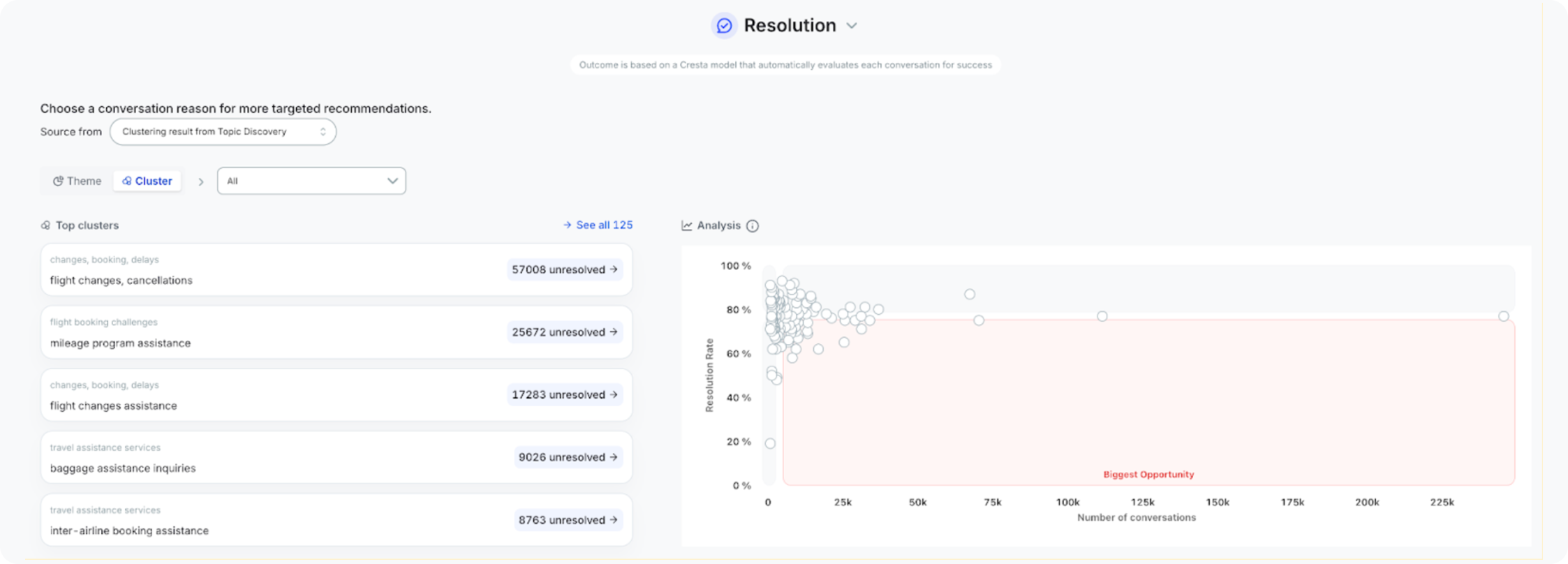
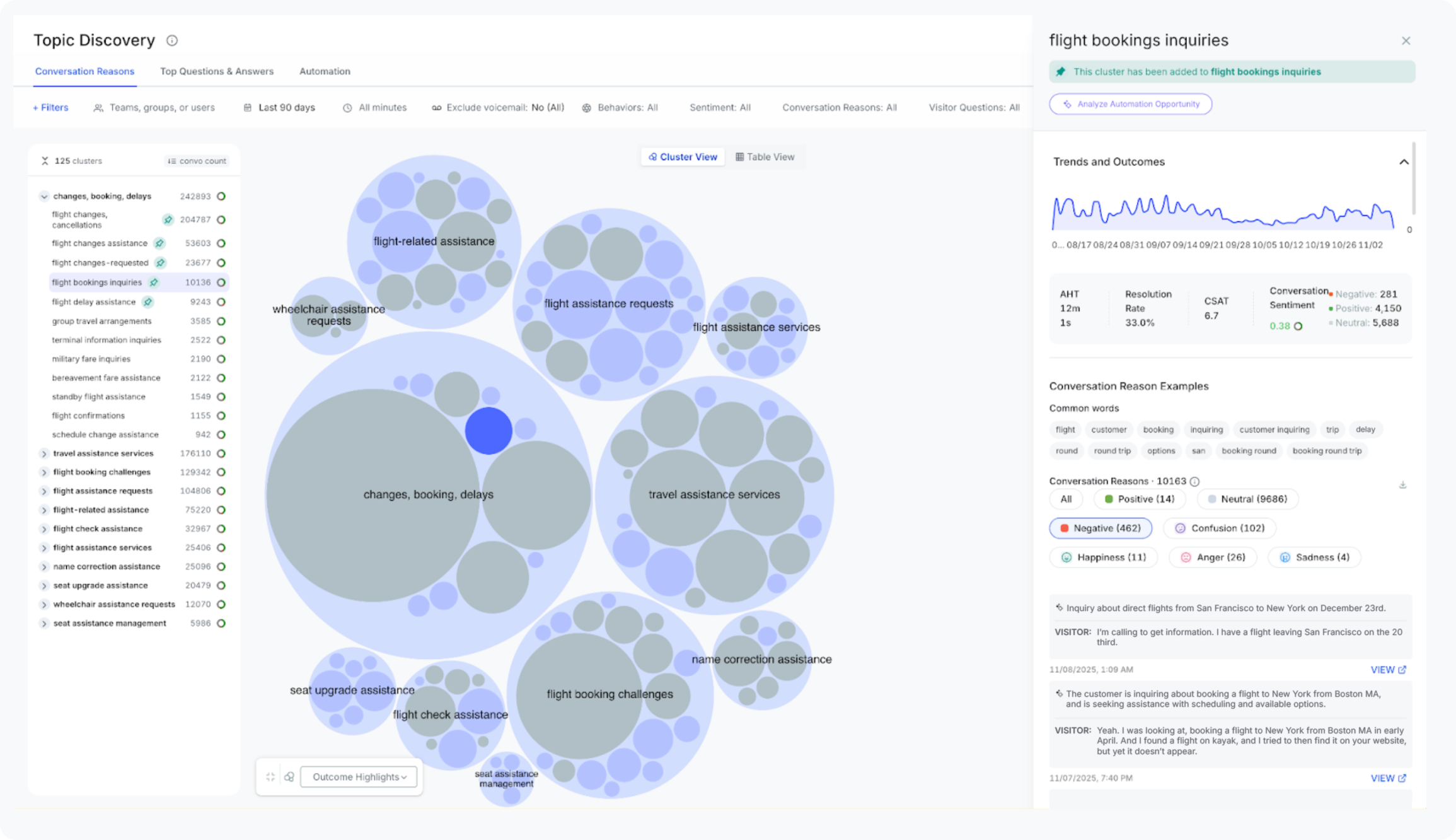
Insights (Topic Discovery) provides a bird’s-eye view of conversation topics and outcomes:
- Map the landscape: It finds the major clusters of customer issues and how human agents resolved them
- Lock onto use-cases: It helps us prioritize which slices of topics the AI agent should handle first
- Bound the intents: Insights surfaces real customer phrasings and look-alike intents, so we can explicitly define what the AI agent will handle and what falls out of scope. This data-backed intent mapping prevents ambiguous routing later on.
- Size opportunity & risk: It quantifies volumes, resolution rates, and automation readiness for each opportunity. This lets us estimate potential containment, ROI, and also identify any risky scenarios to approach strategically.
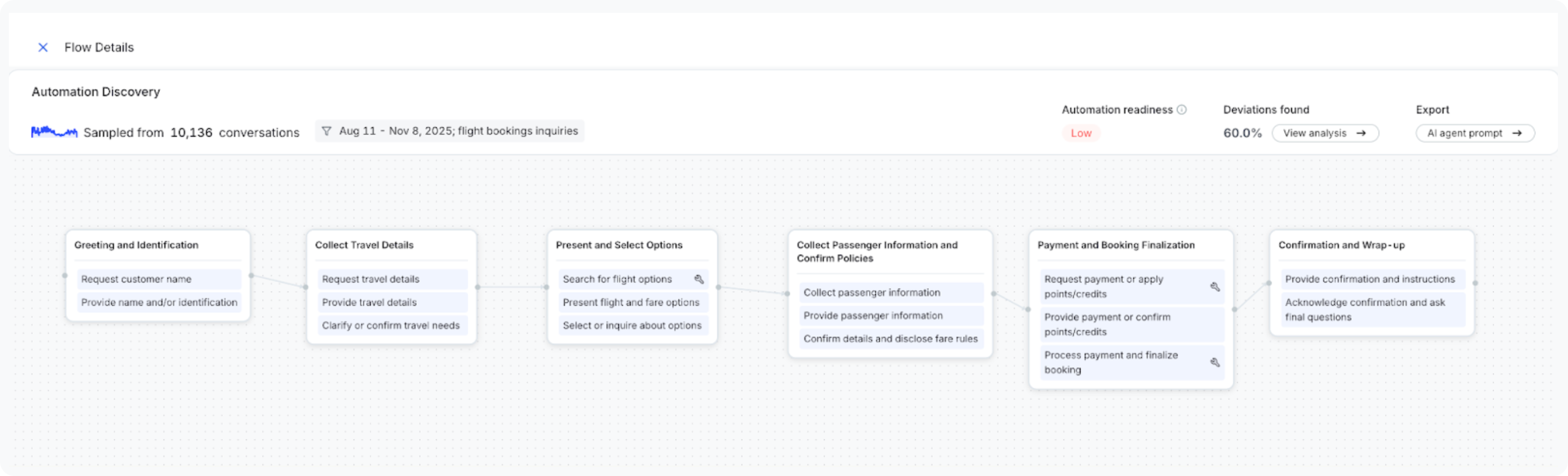
Automation Discovery reconstructs representative dialogue flows from the transcripts:
- State machine skeleton: It identifies the dominant paths customers take to reach resolution, which forms a blueprint for the AI agent’s conversation stages and decision points
- Exception handling & handoffs: It highlights where conversations commonly derail or get handed to managers, helping specify fallback and escalation strategies for the AI agent
- Tool catalog: identifies critical data dependencies and system touchpoints, so users can spec function schemas (inputs, outputs, error shapes) more easily
- Tool use and data needs: It catalogues what internal systems or data the agent would need (e.g. CRM lookups, order adjustments), so we can plan the function calls the AI agent must be able to invoke
- Micro-skills -> agents: It reveals if the task naturally breaks into multiple sub-tasks that might merit separate specialized agents.This informs a potential multi-agent architecture, rather than forcing one monolithic prompt to handle everything.
By the end of scoping we have a clear, evidence-based design for the AI agent. We know which use-cases it will cover, the key intents and utterances it must recognize, the stages of the conversation flow, and the backend tools or APIs it needs to integrate with. In short, it is a v1 spec grounded in reality: a target scope, router rules, skill breakdowns, guardrail points, and even starter prompt wording, all before writing a single line of agent code.
Get our workbook to assess each vendor with confidence
World Modeling and Simulation with Realistic Personas
With the initial flow and requirements defined, we shift into world modeling: basically, building a safe sandbox that emulates the client-specific CX world. Before the AI agent ever faces a live customer, we want to simulate as many scenarios as possible and see how it performs through through Simulated Visitors.
What exactly is a “simulated visitor”? It’s a realistic virtual customer users can spin up on demand. Each one is a compact spec: a persona with tone and vocabulary, a clear goal of what “done” means, and a world state the agent must navigate: authentication, entitlements, status, partial data, the messy stuff. We also bake in behavior policies (how this person asks, clarifies, pushes back). Because these simulated visitors are generated from de-identified real conversations, they feel like real customers (complete with typos, emotions, and curveballs) while remaining privacy-safe. They are far more nuanced than a generic script or a single GPT prompt; for example, a persona might intentionally misunderstand a policy explanation to see if the agent clarifies, just like a real customer might.
We then use these persona specs to simulate full multi-turn conversations between each virtual customer and the AI agent. Depending on the setup, the conversation might start from the customer’s side (inbound) or the agent's side (outbound), and it plays out naturally based on their goals and behaviors. Critically, we know “what should happen” in each scenario: the expected successful path or outcome, so we can automatically evaluate what actually happened vs. what should have happened. The result of each simulation run is a scored transcript with precise reasons for any failures and artifacts users can diff across prompts, tools, or models. This plugs straight into our Automated AI Agent Testing suite for unified testing and reporting where engineers can diff transcripts between agent versions, drill into errors, and trace issues to root causes.
Think of it as a controlled pool of customers that are always ready to test the developed AI agents. Because the simulator can spin up hundreds of variations of a scenario, it’s great for catching edge cases that never surfaced in a low-volume manual test. We routinely see the simulated visitors discover odd corners. Therefore, it isn’t just for development: after go-live, we also keep expanding the pool with new conversation patterns as real users interact with the agent, so we can continually run regression tests, drift checks, and quick “what-if” experiments on demand. Simulated Visitor gives us high-confidence coverage of “known knowns” and “known unknowns” before the real world can throw “unknown unknowns” at our agent.
Building the Agent with Cresta’s AI Agent Framework and Config Bundles
After designing the flows and assembling a simulated world, the actual agent build is a much smoother engineering exercise. In Cresta’s platform, an AI agent isn’t just a single large language model prompt. It’s a versioned, modular configuration that encapsulates everything the agent needs: its prompts, decision logic, tool integrations, and guardrails that can be iterated and version-controlled. This approach stands in contrast to ad-hoc prompt hacking. It treats the AI agent as a first-class software artifact. Learn more about our AI Agent Builder here.
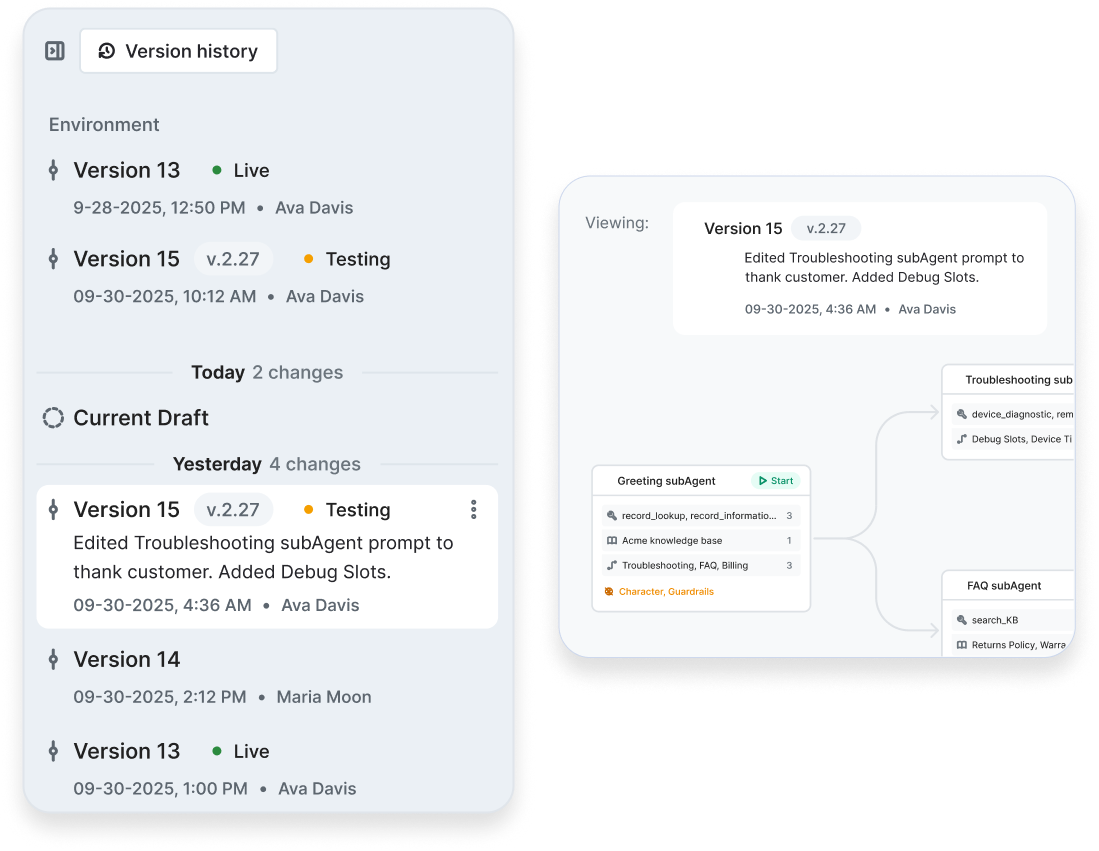
Cresta’s AI agents ship as versioned configuration bundles. Every time we tweak a prompt, adjust a workflow stage, or add a new API function, those changes are tracked in the config and can be diffed, rolled back, or A/B tested in isolation. Under the hood, the agent’s reasoning and capabilities are extended by Cresta’s AI Agent Framework which is a declarative framework that lets developers register backend functions. The framework is optimized for ultra-low latency, so when the AI agent needs to invoke a tool, it happens almost instantaneously, preserving a smooth real-time conversation.
This modular design also enables a multi-agent architecture when needed. Based on the earlier automation analysis, users might decide to implement specialized sub-agents for distinct tasks. Cresta’s framework supports this composition, so each skill can be built and tested independently and then unified in an orchestrated flow. The config bundle will capture how these agents hand off to each other or share context, all of which is testable in simulation.
The optimization loop is simple: Tweak the agent config or remote functions, run the test set, and fix whatever shows up in red (bad routes, schema mismatches, guardrail violation etc). Hit rerun and compare to the last green run. Every test run is automatically archived, so users can compare the latest run to previous ones. If it clears the requirements (pass rate, no criticals, tool-accuracy targets), we then lock the version and push live.

Post‑Launch Monitoring and Continuous Improvement (Opera, Dashboards, and AI Analyst)
Once an AI agent is live and serving production traffic, we monitor its performance much like we monitor human agent conversations—using Cresta’s unified platform.
This usually starts with Dashboard Builder, where we set up custom dashboards to monitor all the metrics we care about tracking for a given agent. This includes metrics one would regularly monitor in both human and AI agent conversations, such as:
- Conversation volume
- Average handle time
- Resolution and/or containment rate
- Customer sentiment and/or predicted CSAT
Additionally, AI agents expose telemetry that allows monitoring their AI-specific aspects. This includes metrics common to AI agents, or specific to certain types of AI agents. For example:
- Interruptions
- Handovers between specialized AI agent experts that are imperceptible to the caller
- Reasons why conversations ended or were routed
- Any custom action the agent did or detected, such as reasons for escalation, authentication or payment methods, resolution steps, etc.
The Trends and Anomalies page automatically detects shifts in the distributions of conversation reasons, questions asked, or custom categories, which provides a quick way of assessing that something may need attention, or that the way people interact with AI agents is evolving.
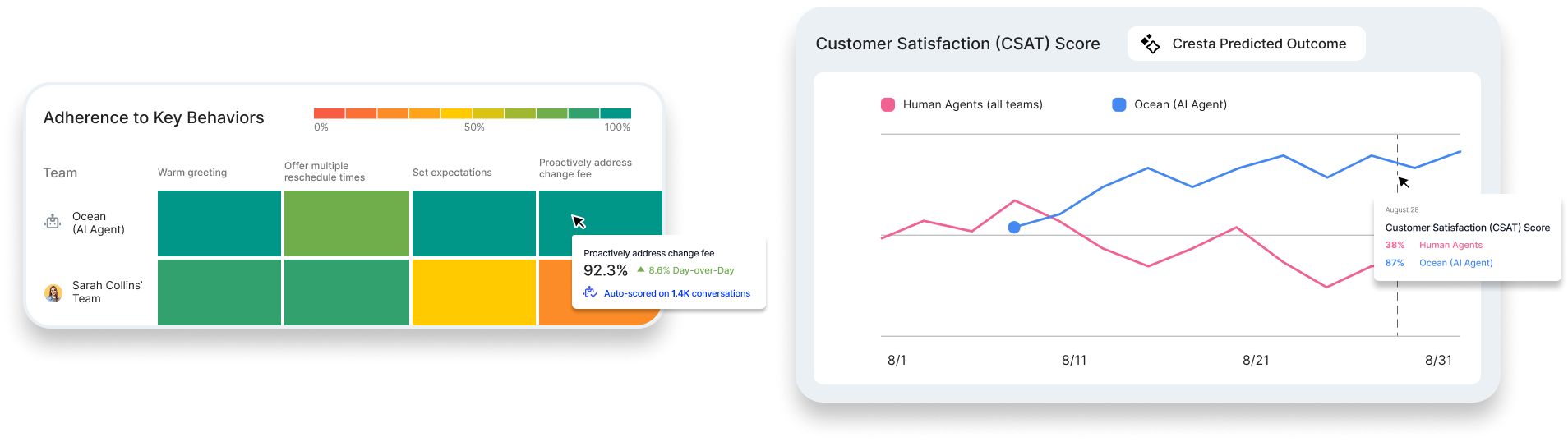
We use Cresta Opera in tandem with Performance Insights to monitor the AI agents’ adherence to the behaviors we care about. A lot of AI agent requirements map exactly to behaviors and are the same for human and AI agents. We found over the years that the biggest challenge in tracking adherence to key behaviors (such as “the agent used the appropriate greeting”, or the “the agent expressed empathy when appropriate”) is making it easy for our customers to align the system to their specific preferences and requirements (in this case, what exactly constitutes an appropriate greeting or expression of empathy—every one of our customers has their own set of preferences in this matter).
Cresta Opera makes it easy to define custom behaviors, so we use it to define the AI agent behaviors we care about tracking, and in the case of customers who use Cresta for both AI and human agents (which is usually the case) we can often share the same behavior definitions between the two.
Finally, for discovering unknown unknowns or for specialized queries, Cresta AI Analyst™ can answer arbitrary questions about both human and AI Agent conversations that are not already answered by these other tools. Here are some example questions we, or our customers, ask AI Analyst to gain insights into our AI agents’ performance:
- Why are customers asking to be transferred to a human agent?
- In conversations where the customer has more than one issue, how often is the AI agent resolving all of the issues without having to escalate to a human agent?
- In calls in which the customer is calling to reschedule an appointment, what are the main reasons why the appointment can not be rescheduled by the AI agent?
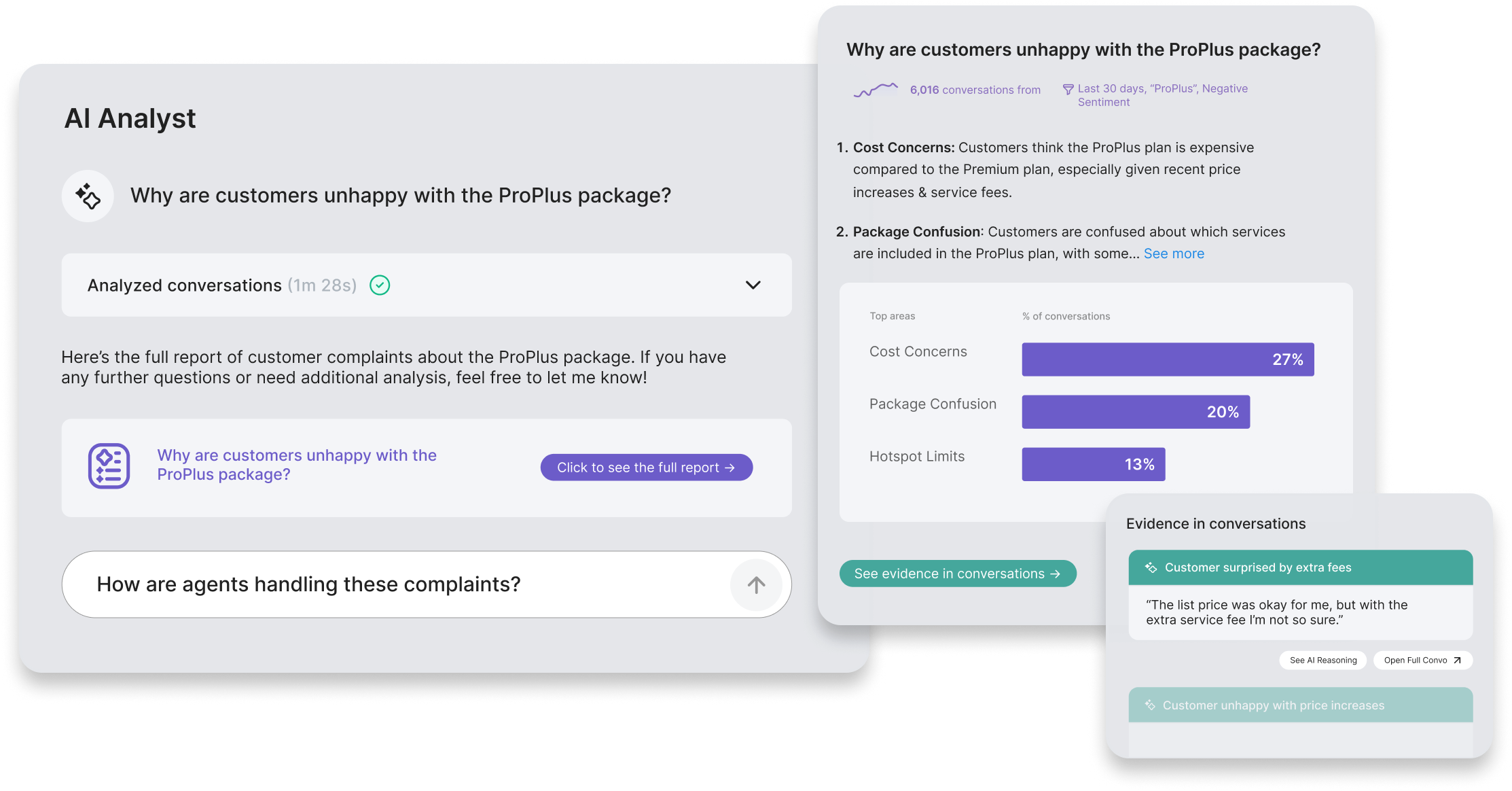
AI Analyst provides detailed reports in answer to such questions, which contain insight that can be traced back to specific moments in conversations, making it easy to debug issues and improve the AI agents if needed.
Lessons Learned in Aligning AI Agents with Humans
Building production-grade AI agents is as much about people as technology. Over several deployments, we’ve learned a lot about how to align AI behavior with human preferences and how to test AI systems effectively before they reach customers. Here are some of the key takeaways:
- When aligning an AI agent to human preferences, make the task as easy as possible for the human:
- Do nots:
- Don’t ask people to write a perfect, exhaustive list of requirements from scratch or label thousands of examples at once. No one gets it 100% right upfront, and this leads to fatigue.
- Don’t expect stakeholders to imagine every way the agent could fail in advance, or to read through entire transcripts in detail to find issues.
- Instead:
- Do involve humans in a targeted way during the iterative loop. Show them a specific conversation turn where the agent did something questionable, and ask a pointed question (It’s much easier for a person to answer yes/no to a concrete scenario than to speculate in the abstract)
- Do provide the rationale and context when seeking feedback.
- Do capture that human feedback and loop it back to improve the system. Every clarification from a human should either adjust the agent or its evaluation guidelines going forward, so we don’t ask the same question twice.
- Do nots:
- We can’t foresee every failure and that’s okay:
- No matter how much upfront design you do, most ways an agent can fail won’t be apparent until we launch. Users will surprise you.
- The key is to have a process that rapidly discovers and fixes failures when they occur. That’s why the simulated testing and the post-launch analytics are so vital.
- Not all requirements are created equal:
- In practice, some agent behaviors are absolutely critical (e.g. legal compliance like not making a false promise, or a security step like verifying identity before account changes), while others are nice-to-have (e.g. using the customer’s name in greeting). We learned to prioritize requirements by criticality.
- This prevents getting “stuck” trying to make the AI agent 100% perfect on minor style points, when it could already be delivering value safely. It also guides the AI agent in how to handle trade-offs.
- Use the right evaluation method at the right time:
- There’s no one-size-fits-all metric or test for AI quality.
- We use a combination of dynamic (conversation-level) and static (turn-level) tests. For a deeper dive, check out our recent blog.
Building an AI agent that customers love isn’t just about prompting a fancy model: it’s about engineering an entire lifecycle of design, simulation, rigorous testing, and continuous improvement. By structuring a pre-production testing loop, you avoid playing whack-a-mole with issues in production. By aligning AI behavior with human-defined preferences at every step, you ensure the AI agent truly embodies your brand’s values and service standards. And by leveraging data and proven tools (rather than starting from scratch), you achieve all this with speed and confidence.
Cresta’s journey has shown that the gap between a promising AI demo and a production-grade AI agent can be bridged with the right engineering and alignment approach. The lessons we’ve learned are now baked into the Cresta platform, empowering our customers to build AI agents faster and with greater confidence than ever before and we’re excited to continue leading the way in this new era of customer experience.